
To keep track of Amazon influencer products, log the item the day you say yes to it, not the day the box lands, and give every item one status that says where it is in the process. That turns arrival into a status change instead of data entry, and it means the list can always answer the only question that matters on a filming day, which is what to pick up next.
I’ve got 1,570 products logged and 1,604 videos tied to them. Those numbers aren’t a brag, they’re the reason I need a system at all. A pile that size stops being something you can hold in your head very quickly, and mine did.
How did you track products before you had a system?
A spreadsheet. It worked until it got too big, and then it turned into a thing I had to scroll instead of a thing I could read. I moved everything into Airtable after that, and I still run it there today because it’s set up and established and all of my automations hang off it.
I want to be straight about the order things happened in here, because it isn’t the usual version. Nothing blew up. I didn’t lose a brand deal and then rebuild my life around a database. I built a system, it worked, and it kept working, and the whole reason this post exists is that I have seen keeping track of samples come up in creator groups and I had something that was already solving it.
Why I log a product before it ever arrives
This is the habit that makes everything else work, and it’s the one I’d hand over first.
The row gets created when I say yes, not when the box shows up. At that moment I put in the name, the ASIN, the brand’s email if I have one, a note if there’s anything I need to remember, and where it came from, which for me is Creator Connections, email, or a DM. All five of those are things I already know from the offer. None of them need the product in my hands. The source field is the one I lean on most later, and it is the same short list every time, which I broke down in where my Amazon influencer products come from.
So when the box does show up, there’s no data entry. There’s a status change. The thing was already in the list, waiting, and now it moves one step forward.
Boxes also arrive without warning and often without a name you recognize. A plain brown box with a shipping label isn’t going to tell you which campaign it came from two weeks after you accepted it. The row already knows.
What one status per item actually does
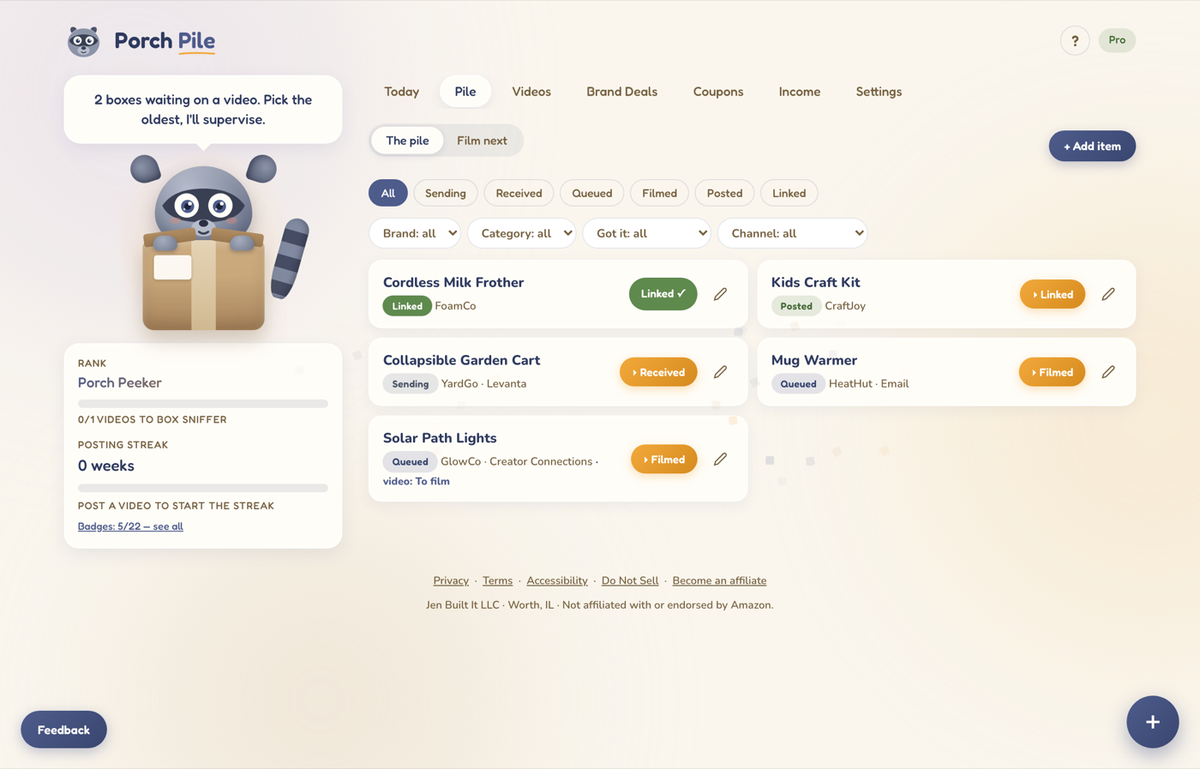
Every item in my system sits in exactly one state, and it moves forward through them: sending, received, queued, filmed, posted, linked. Sending means it’s on its way. Received means it’s here. Queued means I picked it as one of the next things to film. Then filmed, then posted, and last linked, which means I’ve sent the video links where they need to go, which for me is to the brand. After linked, the item is done as far as the pile goes, and what I do with the product itself is a separate decision.
One field, six values, and no item is ever in two of them. That sounds almost too plain to be the answer, and it’s still the answer. A list that can tell you where every item is can also tell you what is next, and a list that can’t do the first thing can never do the second.
On my video side the same idea runs as a queue. Right now I have 157 things sitting in do-video and 891 marked complete, with another 486 waiting on socials. I don’t think of those as a scoreboard. They’re just the shape of the pile on a Thursday. Not all of the to-do items were sent to me. Some are just products I want to do around my house.
How I decide what to film
I shoot for oldest first. That is the rule, and it keeps the queue from turning into a graveyard at the bottom.
The exception is that I will grab anything that lights me up in the moment, especially to get warmed up for a batch of videos. Starting with something I’m actually interested in makes the next six easier, and I’d rather film seven things in a good mood than two things correctly in order.
What happens when the pile gets ahead of me
It does get ahead of me. I get myself into a pickle often with a backlog of things to review, and I want that on the record in a post about staying organized, because a tracker isn’t a personality transplant.
Staying organized is a must. It’s also only half of it. The other half is learning what you can and will review without freezing, and that part took me longer to learn than any of the field-and-status stuff above.
Right now I have something I have to build before I can film it, and it’s causing a huge delay. I should have never said yes to it. I feel terrible about it. The system did its job and told me exactly what was waiting, and I still said yes to a thing I didn’t want to do, so the item sits there and the delay is mine.
Where Porch Pile fits
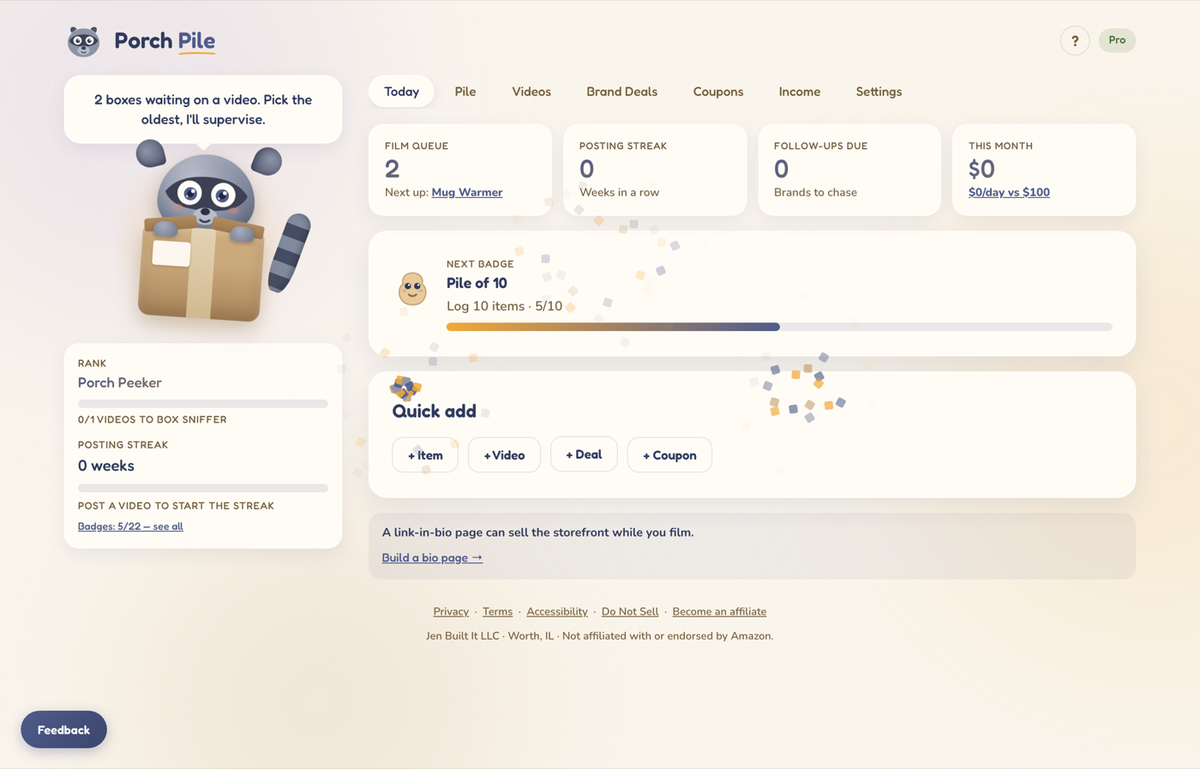
I liked my own setup enough that I turned it into a web app, which is Porch Pile. I use and test my own apps, so I run both: Airtable stays the established base with the automations, and Porch Pile is the version of the same system built for someone who doesn’t want to construct a database first.
In plain words, it holds your items with the same six statuses, keeps your videos tied to the item they came from, tracks brand deals and what you owe them, and opens on a screen that tells you what to film next and who needs a follow up. That’s the whole idea. It’s the thing I wanted my spreadsheet to be, without me having to wire it together.
What to do if you’re starting from a notes app
| Notes app | Spreadsheet | Database or app | |
|---|---|---|---|
| Works until | the list is longer than one screen | you scroll it instead of read it | it keeps working |
| Can it tell you what to film next | No | Only once you add a status column | Yes, that is the home screen |
| Holds several videos per product | No | Not without a second sheet | Yes |
| What it costs you | Nothing | Nothing, plus the evening it eats | Setup time, or a tool that did the setup for you |
Give every item one status. That’s the first change, and it’s worth more than picking the right tool.
You can do it in the spreadsheet you already have. Add one column, decide on your handful of states, and make a rule that nothing lives in two of them. Once the list can tell you where things are, you can ask it what is next, and that’s the moment tracking starts paying you back instead of costing you an evening.
This week’s practice: give every item one status
- Open whatever you track products in right now, even if it’s a note on your phone.
- Add one status field and pick your states. Mine are sending, received, queued, filmed, posted, linked.
- Go through the list once and set a status on every single item, no blanks.
- Log the next product the day you accept it, before it ships, with the name, the source, and the brand’s email.
- Sort by oldest and film the top one.
Frequently asked questions
How do I keep track of Amazon influencer products?
Log every product the day you accept it and give it one status that says where it is in the process. The five things worth capturing at the start are the name, the ASIN, the brand’s email, a note, and where it came from, because all five are known before the box ships. After that, the only work is moving each item forward one step at a time.
What should I track for each influencer product?
Name, ASIN, source, brand contact, and status cover it for most items, and a price field helps later if you ever need one. I also link each product to the videos made from it, which matters because one product can turn into several videos and a flat list can’t hold that relationship.
Do I need an app, or is a spreadsheet fine?
A spreadsheet is fine, and mine was a spreadsheet first. It stops being fine once it gets big enough that you scroll it instead of read it, which for me was the moment I moved to a real database. Add the status column to what you already have before you go shopping for a tool. It is the same advice I give about gear in the tips I would give myself before 1,300 videos, which is that friction is what stops you, not the tool.
How do you decide which product to film next?
Oldest first, with one exception. I’ll grab something that lights me up when I need to get warmed up for a batch, because starting with a product I’m interested in makes the rest of the session easier. The queue exists so that decision takes ten seconds instead of ten minutes.
What do you do when you have a backlog of products to review?
Work the oldest end of it and be honest about what is actually blocking you. A backlog is usually a few specific items you’re avoiding rather than the whole pile, and in my case it’s a product I have to build before I can film it. Knowing which item is the blocker is the part a tracker can give you.
Should you say yes to every product offer?
No, and tracking can’t solve that one for you. Learning what you will genuinely review, without freezing, matters as much as the system that holds it. An item that needs assembly or a long setup is the kind I most often regret accepting.
A tool I built
Dopamine Dealer
Track your habits and get a hit of dopamine every time you check one off. No willpower required.
Start your streak →I run an affiliate program on the tools I build. Approved affiliates earn 20% on what their referrals pay, for up to a year. US only for now. See the program →
Related reading
- What I Do With Amazon Influencer Products After I Film Them
- How Do Amazon Influencers Get Products? Where Mine Come From
- Amazon Influencer Program Tips I Wish I’d Started With
- A Free Side Hustle Income Tracker
Keeping track of Amazon influencer products comes down to logging the item before it arrives and giving every one of them a single status, so the list can always tell you what to film next. Pick one item out of your pile today, set its status, and film that one.