
This Oink for Influencers review comes from an early user, and my advice is to install the free version right away and upgrade when you can tell it makes sense. Oink is a Chrome extension for Amazon influencers that helps with product research, Creator Connections campaigns and messaging brands. The free plan costs nothing, and Pro is $29.99 a month or $249.99 a year. I pay for Pro because it pays for itself over and over for me.
Heads up: some links in this post are affiliate links, so I earn a commission if you sign up, at no extra cost to you. I only point to tools I actually use.

What is Oink for Influencers?
Oink is a browser extension built for people in the Amazon Influencer Program. It adds information to the Amazon pages you’re already on, so you can see what you need about a product and its Creator Connections campaigns without opening ten tabs and doing math on a notepad.
Rob Wagener builds it, and the Chrome Web Store listing shows 10,000 users and a 5.0 rating from 26 reviews as of September 2026. It works in Chrome, and Oink’s site lists support for Canada, the UK and Australia too.
I was already an old hand in the Amazon Influencer Program when Oink was new, and I think I joined not long after it launched. I’m not totally sure of the date, but so many features have been added since then that I feel like I’ve been there since its infancy.
What changed when I started using Oink?
Before Oink, I was barely touching Creator Connections. Now it’s my biggest earner every month.
Creator Connections is the part of Amazon’s program where brands run campaigns and pay creators a bonus commission for featuring their products. Finding the good ones by hand meant a lot of clicking, so I mostly didn’t. Oink put the campaign information right on the product pages I was already looking at, and that’s what turned it from a section I ignored into the one I check first.
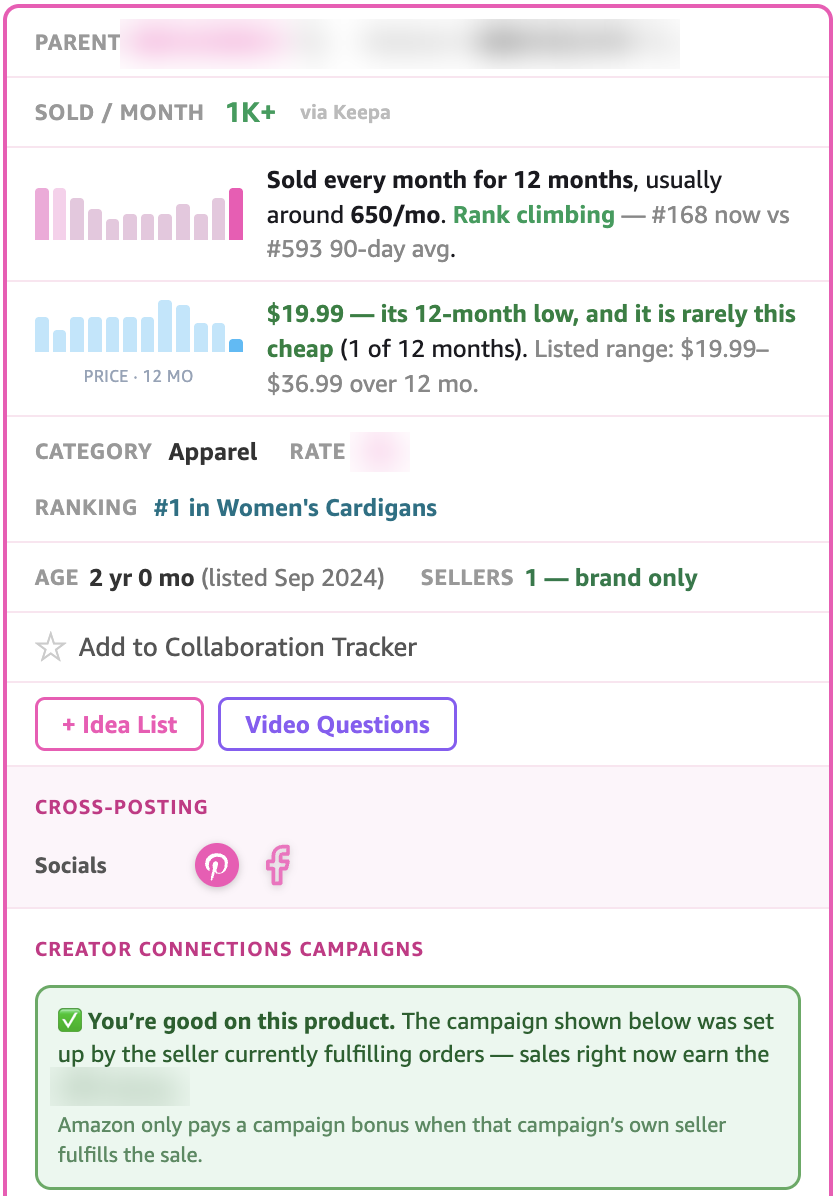
On a product page, Oink’s panel shows roughly how many sell each month, a year of sales and price history, the ranking, how many sellers there are, and whether the Creator Connections campaign belongs to the seller who’s actually filling the orders. I blurred the product codes and the commission numbers.
It also changed how I pick what to film. I went into that in where my Amazon influencer products come from, and the short version is that I mostly go by what Oink shows me.
Which Oink features do I use every week?
These are the ones I’d miss first if Oink disappeared tomorrow:
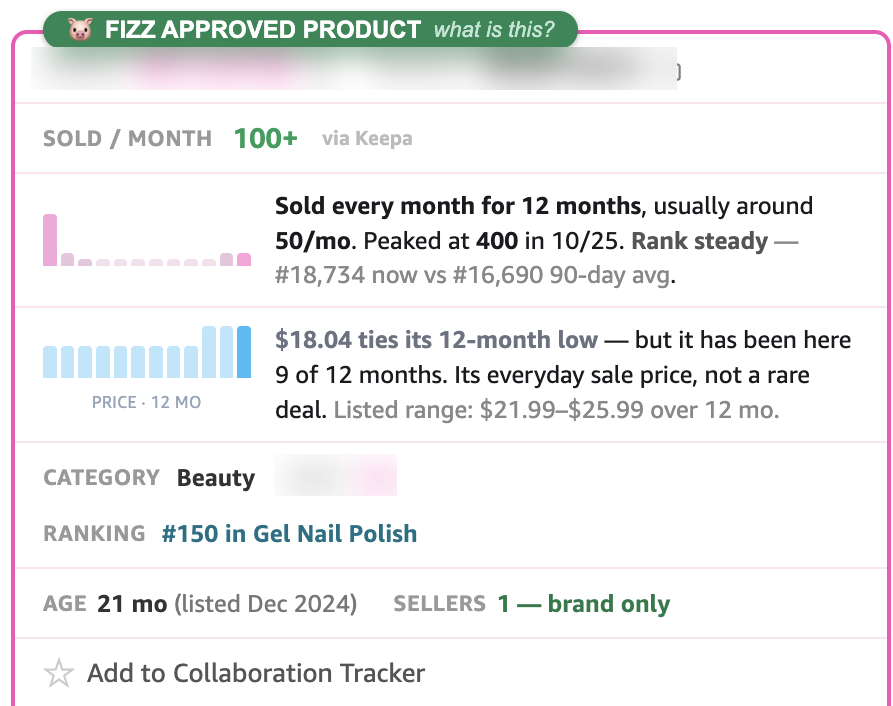
- Product research. Oink shows whether a product has a Creator Connections campaign and how much time is left on it. Since June 2026 it also shows a green Fizz Approved Product seal when a product checks four boxes at once: Amazon shows a “bought in past month” figure, the page has an upper video carousel, there’s a Creator Connections campaign, and that campaign has at least 60 days left.
- Message templates. Oink lets you set up templates and message a brand about its campaign without leaving Amazon. It saves me a ton of time, because I’m not rewriting the same introduction every time.
- Storefront checks. Pro has a set of storefront checks that flag things like over-tagged videos and products that have gone unavailable, plus a copyright audit for finding brands using my videos. I try to do this once a month, and I’ve skipped a few months, so I’m not the best example here.
There are features I’ve never touched, like the collaboration tracker, because Oink has a lot in it and I use the parts that fit how I work.
This is the seal on a real product page, sitting right above the rest of Oink’s panel.
What does the free version of Oink include?
More than I expected when I went through the comparison table on Oink’s site. Here’s a sample of how the two plans split, based on Oink’s own table in September 2026:
| Feature | Free | Pro |
|---|---|---|
| Creator Connections campaign highlighting | Yes | Yes |
| Messaging a brand about a single campaign | Yes | Yes |
| Earnings tracker | Yes | Yes |
| Basic storefront tools and quick edit | Yes | Yes |
| Break-even and profit calculator | Yes | Yes |
| Storefront performance, over-tagged and unavailable checks | No | Yes |
| Copyright audit | No | Yes |
| Daily sales check | No | Yes |
| Private strategy Facebook group | No | Yes |
The full table on Oink’s site has around 60 rows, so check it for anything specific you’re after.
Should you start with the free version of Oink?
Yes, and get it right away, even if you just joined the program. The free version shows you Creator Connections campaigns on the products you’re already looking at, which is useful from your first video.
When to upgrade is your call, and it depends on where you are. You want to be earning enough that $29.99 a month doesn’t sting, but you’ll also likely earn more once you have Pro, so waiting too long costs you something too. I don’t have a dollar amount to give you. Use the free one for a while and you’ll probably be able to tell when it makes sense.
If you do upgrade, my code JENNIFER takes 10% off, and you can enter it as a coupon code on the Stripe checkout screen.
Is there anything I don’t like about Oink?
One small thing. Sometimes Oink opens a new tab and pulls me over to it while I’m in the middle of something else. It’s a super small annoyance, but it’s there.
Otherwise, I can’t think of anything. I’ve been challenging myself to build a lot of my own tools lately, and I wouldn’t even attempt to clone Oink, because I love it too much and it already does the job. The one I did build for this side of the work is Porch Pile, which keeps every product in my pile on one screen and tells me what to film next.
Why Rob and his Facebook group matter as much as the features
Rob is constantly shipping new features to Oink, and I don’t think he sleeps. The Chrome listing was updated on September 16, 2026, and there have been a lot of updates like that since I started.
He also keeps us current on Amazon changes in his Facebook group, and he’s always trying to help us improve, with Oink and with the program in general. Amazon changes things often, and having someone explain what changed has been as useful to me as any single feature.
This week’s practice
- Install the free version of Oink in Chrome.
- Open three products you already own and would film.
- Check each one for a Creator Connections campaign and how many days are left on it.
- Film the one with the most time left first.
Frequently asked questions
Is Oink for Influencers free?
Yes, Oink has a free plan that costs $0 and doesn’t expire. It includes Creator Connections campaign highlighting, single-campaign brand messaging and an earnings tracker. Pro adds storefront checks, a copyright audit and a private Facebook group.
How much does Oink Pro cost?
Oink Pro is $29.99 a month or $249.99 a year on Oink’s site, as of September 2026. My code JENNIFER takes 10% off at checkout.
When should I upgrade to Oink Pro?
Upgrade when the monthly price stops feeling like a stretch and you’re using the free version often. There isn’t a set earnings number for it. I’d start free and watch how much you lean on it.
Does Oink help with Creator Connections?
Yes, and that’s where it helps me most. It shows campaign information on product pages and lets you message brands about a campaign from inside Amazon. Creator Connections went from something I barely touched to my biggest earner every month after I started using it.
What does Fizz Approved mean in Oink?
Fizz Approved is a green seal Oink shows on a product page when four things are true: Amazon shows a “bought in past month” figure, there’s an upper video carousel, the product has a Creator Connections campaign, and that campaign has at least 60 days left.
Does Oink work outside the US?
Yes, Oink’s site lists Canada, UK and Australia support on the free plan. I use it on Amazon.com, so the US version is the one I can speak to. If you’re still getting started in the program, Amazon Influencer Program tips I wish I’d started with covers the early steps.
A tool I built
Porch Pile
Track your whole Amazon Influencer operation, every product, video, and brand deal, so one glance tells you what to film next.
Start your pile →I run an affiliate program on the tools I build. Approved affiliates earn 20% on what their referrals pay, for up to a year. US only for now. See the program →
Related reading
- Amazon Influencer Program Tips I Wish I’d Started With
- How Do Amazon Influencers Get Products? Where Mine Come From
- How I Keep Track of Every Amazon Influencer Product
- Why My Amazon Influencer Videos Get Rejected, and What I Do
Oink for Influencers is a Chrome extension that shows Amazon influencers product research and Creator Connections information right on Amazon, and the free version is enough to start with. Install it this week, check three products you already own, and let the campaigns tell you which one to film first.